Browser softphone for call center agents
Agents should spend their day on callers, not on desk phones and cables. Halo's browser softphone lets them answer, hold, transfer and make calls in the browser, so a working computer is all a seat needs to take calls.
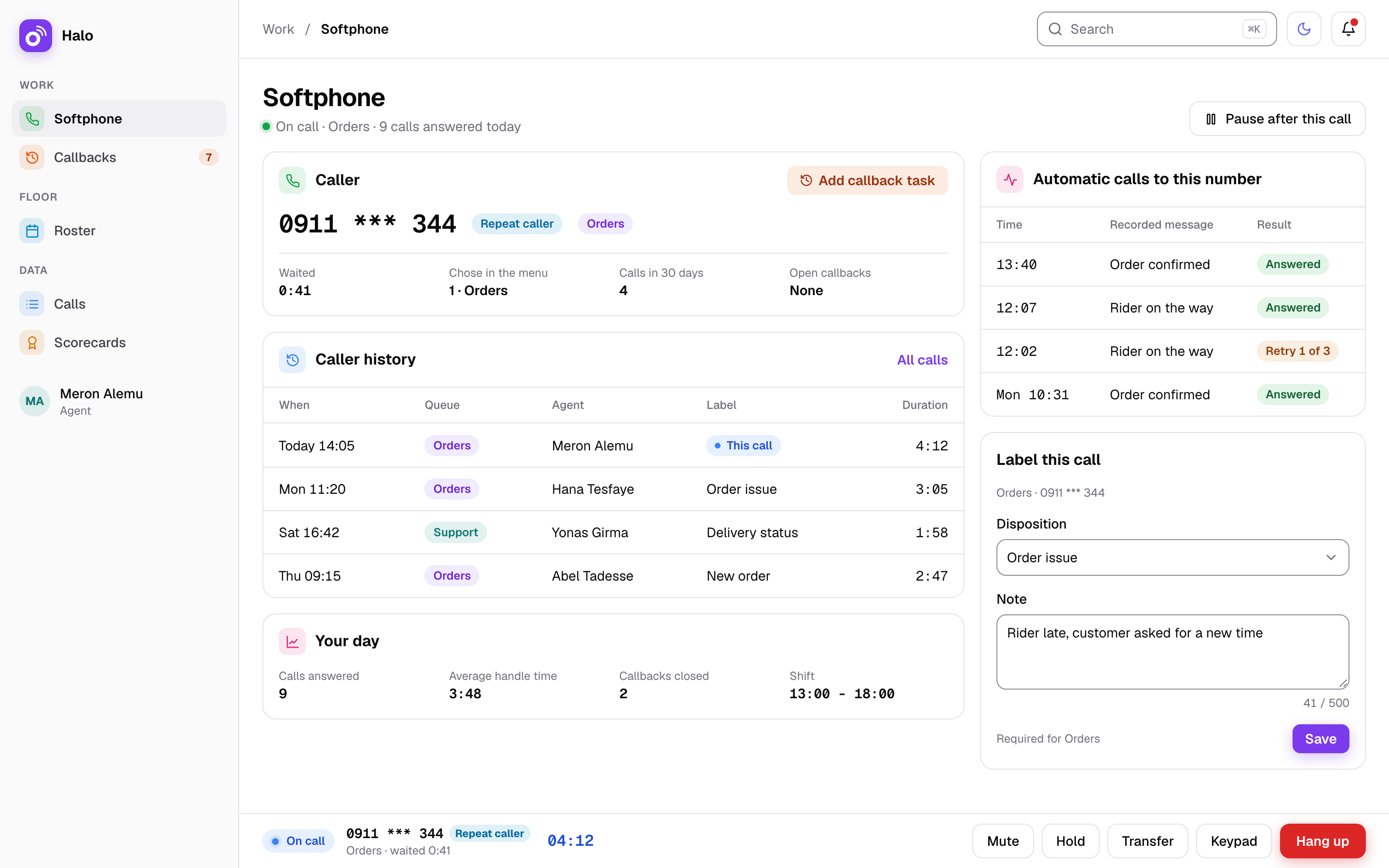
Browser softphone
What you get
The browser softphone is the agent's phone inside Halo. Calls, call controls and transfers sit on the same screen the agent already works in, and the rules your admin sets apply to every call.
Every call control in the browser
Agents answer, hold, mute and use the keypad from the browser. There is no second device to learn and no handset to share between shifts.
Blind and attended transfer
Pass a caller straight to a colleague, or speak to the colleague first and then hand the call over with the context explained.
Dial out within your rules
Agents call customers from the same screen, within the rules your admin allows. Daily outbound call caps apply, and international calls are blocked by default.
No desk phones needed
Call audio is relayed through your Halo server. A new seat needs a browser, not a desk phone, a cable run or a phone configuration.
Works on strict office networks
Some office networks block normal call traffic. For those, Halo has a fallback over port 443, so calls still reach the agent.
Two-step login for phone users
Phone users sign in with two-step login, and accounts lock after repeated wrong passwords. Halo also keeps a full audit log.
How it works on a busy day
At 09:05 Meron Alemu opens Halo in her browser and signs in with her password and the second step. A call from 0911 *** 344 comes in on the “Support” queue. She answers, puts the caller on hold to check the order, and comes back a minute later.
The caller needs help that Meron cannot give, so she makes an attended transfer to Yonas Girma. She explains the case to him first, then hands the call over. The caller does not have to repeat the story.
At 11:30 Meron’s browser closes by mistake during a queue call. The caller goes back to the front of the “Support” queue within seconds, and Selam Haile answers next. Meron opens the browser again and is ready for the next call.
Facts
- Call controls
- Answer, hold, mute and keypad in the browser
- Transfers
- Blind and attended
- Desk phones
- Not needed; call audio is relayed through your Halo server
- Office networks that block call traffic
- Fallback over port 443
- Browser closes during a queue call
- Caller back to the front of the queue within seconds
- Sign-in
- Two-step login for phone users
- International calls
- Blocked by default
Questions about the browser softphone
Do our agents need desk phones?
No. Agents answer and make calls in the browser, and call audio is relayed through your Halo server. Hold, mute, the keypad and transfers are all on the agent’s screen. You can add seats without buying handsets or running phone cables to each desk.
Will it work if our office network blocks call traffic?
Yes. Some office networks block normal call traffic. Halo has a fallback over port 443 for those networks, so the browser softphone can still carry calls. Port 443 is the port that secure websites use.
What happens if an agent's browser closes during a call?
If the browser closes during a queue call, the caller goes back to the front of the queue within seconds. The next ready agent answers, and the caller does not start again at the back of the line.
Can agents call any number they like?
Agents dial out within the rules your admin allows. Daily outbound call caps limit how many calls each person can make, and international calls are blocked by default. Halo also keeps a full audit log.
Is there a mobile app for agents?
Not in v1. Agents use a browser on a computer. A mobile app and calling from inside mobile apps are both outside the first version of Halo, so plan your seats around computers with a browser.
Related features
Where this matters most: Delivery and logistics. See how Halo is priced on the pricing page.